Showing posts with label development. Show all posts

Friday, January 1, 2021

Obfuscate AutoIt Scripts from Python code

If you would like to protect your AutoIt scripts from hackers and decompilation you might want to obfuscate their source code with an AutoIt Obfuscator.

Obfuscation protects the original AutoIt source code against analysis & reverse engineering. Unfortunately, AutoIt decompilation is easy with tools like aut2exe (try it yourself).

Obfuscation protects the AutoIt code against reversing, so even after decompilation the source code will stay safe from prying eyes, hackers, and competition.

Now it's possible to automate this process using Python 3 code with a dedicated Python 3 module:

https://pypi.org/project/autoitobfuscator/

Source code of this module along with usage examples is available at GitHub:

https://github.com/PELock/AutoIt-Obfuscator-Python

Sample usage example in Python:
#!/usr/bin/env python

###############################################################################
#
# AutoIt Obfuscator WebApi interface usage example.
#
# In this example we will obfuscate sample source with default options.
#
# Version        : v1.0
# Language       : Python
# Author         : Bartosz Wójcik
# Web page       : https://www.pelock.com
#
###############################################################################

#
# include AutoIt Obfuscator module
#
from autoitobfuscator import AutoItObfuscator

#
# if you don't want to use Python module, you can import directly from the file
#
#from pelock.autoitobfuscator import AutoItObfuscator

#
# create AutoIt Obfuscator class instance (we are using our activation key)
#
myAutoItObfuscator = AutoItObfuscator("ABCD-ABCD-ABCD-ABCD")

#
# source code in AutoIt v3 format
#
scriptSourceCode = 'ConsoleWrite("Hello World")'

#
# by default all options are enabled, both helper random numbers
# generation & obfuscation strategies, so we can just simply call:
#
result = myAutoItObfuscator.obfuscate_script_source(scriptSourceCode)

#
# it's also possible to pass script path instead of a string with the source e.g.
#
# result = myAutoItObfuscator.obfuscate_script_file("/path/to/script/source.au3")

#
# result[] array holds the obfuscation results as well as other information
#
# result["error"]         - error code
# result["output"]        - obfuscated code
# result["demo"]          - was it used in demo mode (invalid or empty activation key was used)
# result["credits_left"]  - usage credits left after this operation
# result["credits_total"] - total number of credits for this activation code
# result["expired"]       - if this was the last usage credit for the activation key it will be set to True
#
if result and "error" in result:

    # display obfuscated code
    if result["error"] == AutoItObfuscator.ERROR_SUCCESS:

        # format output code for HTML display
        print(result["output"])

    else:
        print(f'An error occurred, error code: {result["error"]}')

else:
  print("Something unexpected happen while trying to obfuscate the code.")

Thursday, January 9, 2020

Source code recovery

How to recover the lost source code?


To recover source code from the compiled application (e.g. legacy software) you lost access to, you must reverse engineer the binary code of the application. This process is extremely complicated, requiring disassemblers, debuggers and other specialized tools. And a lot of time and experience.

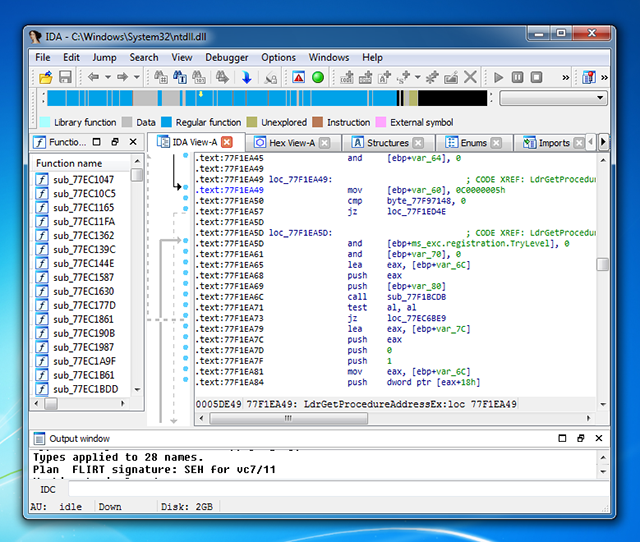
IDA Disassembler is used to analyze the compiled application


Source code recovery solution


Our company offers services of recovering source codes from compiled applications, but also the very fragments of codes, selected algorithms, or sensitive data such as database access passwords. We have a long track of successful reverse engineering projects under our belt and over 15 years of experience in the field, you can read testimonials of what others wrote about our services.

Supported programming project types


We provide source code recovery for the following technologies:

  • C & C++ - recover source code and software algorithms from C/C++ compiled binaries, including Windows EXE, Linux ELF executables & DLL libraries created in Visual C++, Intel C++ Compiler, GCC, MinGW, G++, Clang, C++Builder, Watcom C++, LCC, Pelles C, Digital Mars and other compilers.
  • Java - recover source code from Java and J2EE / JEE applications & applets, restore source code from *.class files, JAR & WAR packages. Restore code from Android APK packages & DEX files. Recover sources from encrypted & obfuscated Java packages.
  • C# aka C Sharp - recover full source code from C# applications, also from protected apps, including those created using WinForms, WPF, WCF, ASP.NET.
  • Visual Basic & VB.NET - restore source code from Visual Basic executables compiled to native or p-code output. Restore sources for the latest VB.NET applications created for the .NET Framework.
  • Delphi & Pascal - source code and algorithm recovery from Delphi applications and any other Pascal based tool & compiler like Lazarus, FreePascal etc.
  • Visual FoxPro - recover source code, databases, queries and other resources from Visual FoxPro, FoxBASE+, FoxPro 1.*- 2.6, Visual FoxPro 3.0, 5.0, 6.0, 7.0, 8.0 and 9.0 applications.
  • AutoIt - recover *.au3 script source codes from compiled AutoIt applications. Restore obfuscated script sources to the original form.
  • Flash SWF ActionScript - recover flash script sources in the ActionScript language and other binary resources from compiled Flash SWF files and standalone Flash applications in EXE format.


Source code recovery example


Here is the sample C++ output code in x86 assembler :

Compiled code. Simple function, disassembled to x86 code

.text:00401000 ; int __cdecl main(int argc, const char **argv, const char **envp)
.text:00401000 _main proc near ; CODE XREF: ___tmainCRTStartup+F8 p
.text:00401000 push 40h ; uType
.text:00401002 push offset Caption  ; "Hi!"
.text:00401007 push offset Text ; "Hello World!"
.text:0040100C push 0 ; hWnd
.text:0040100E call ds:MessageBoxW
.text:00401014 xor eax, eax
.text:00401016 retn
.text:00401016 _main endp

Restored source. C++ code from the x86 output

int __cdecl main(int argc, char *argv[], char *envp[])
{
MessageBox(NULL, L"Hello World!", L"Hi!", MB_ICONINFORMATION);

return 0;
}

Contact information


To learn more or to get in touch with us, please visit our site at:

https://www.pelock.com/services/source-code-recovery

Wednesday, October 21, 2015

String & File Encryption for Programmers and Developers

How to encrypt strings and files in Java, C++, C#, Python, Ruby, Delphi / Pascal, AutoIt?

Now it's simple, you can use StringEncrypt service to encrypt your programming strings and generate the decryption code in the selected programming language.

Example:

// encrypted with https://www.stringencrypt.com (v1.1.0) [C/C++]
// wszLabel = "How to encrypt string or file? Easy encryption with https://www...."
wchar_t wszLabel[82] = { 0xD3B5, 0xC605, 0xB685, 0xA135,
                         0x9675, 0x8605, 0x7135, 0x6565,
                         0x5614, 0x4544, 0x3654, 0x26A4,
                         0x1634, 0x0674, 0xF134, 0xE644,
                         0xD674, 0xC654, 0xB5A4, 0xA614,
                         0x9584, 0x8134, 0x7604, 0x6654,
                         0x5133, 0x4593, 0x35A3, 0x25F3,
                         0x1563, 0x0303, 0xF133, 0xE363,
                         0xD523, 0xC643, 0xB6A3, 0xA133,
                         0x9563, 0x8613, 0x7543, 0x6653,
                         0x56A2, 0x4632, 0x3672, 0x25A2,
                         0x1602, 0x0612, 0xF132, 0xE682,
                         0xD5A2, 0xC672, 0xB5B2, 0xA132,
                         0x95B2, 0x8672, 0x7672, 0x6632,
                         0x5641, 0x42D1, 0x3201, 0x2201,
                         0x1681, 0x0681, 0xF681, 0xE211,
                         0xD641, 0xC671, 0xB651, 0xA5A1,
                         0x9611, 0x8581, 0x7561, 0x6611,
                         0x5540, 0x4650, 0x36A0, 0x2630,
                         0x1670, 0x0210, 0xF540, 0xE600,
                         0xD5E0, 0x5F2F };
 
for (unsigned int Mapyi = 0, PiMAw = 0; Mapyi < 82; Mapyi++)
{
        PiMAw = wszLabel[Mapyi];
        PiMAw += 0xA063;
        PiMAw = ((PiMAw << 15) | ( (PiMAw & 0xFFFF) >> 1)) & 0xFFFF;
        PiMAw --;
        PiMAw = ~PiMAw;
        PiMAw = ((PiMAw << 6) | ( (PiMAw & 0xFFFF) >> 10)) & 0xFFFF;
        PiMAw += 0xC25D;
        PiMAw -= Mapyi;
        PiMAw = ~PiMAw;
        PiMAw += 0x9645;
        PiMAw += Mapyi;
        PiMAw = ((PiMAw << 7) | ( (PiMAw & 0xFFFF) >> 9)) & 0xFFFF;
        PiMAw ^= 0xC301;
        PiMAw -= 0x97E2;
        wszLabel[Mapyi] = PiMAw;
}
 
wprintf(wszLabel);

Encryption algorithm is different each time (random) and so the decryption code is unique for every single encryption.

Usage

StringEncrypt is available as an online service with an extra WebAPI interface and separate Windows application.


StringEncrypt main window with all the encryption options

Supported programming languages

StringEncrypt supports wide range of programming languages and can generate decryption code for the following languages:
Sample decryption code in Java:

// encrypted with https://www.stringencrypt.com (v1.1.0) [Java]
// wszLabel = "Encryption in Java"
String wszLabel = "\uDA19\u9A0D\u5A0B\u9A12\uDA16\u9A10\uDA0D\u1A0B" +
                  "\uDA0A\u9A09\uDA25\u1A09\u5A07\u9A24\uDA18\u1A03" +
                  "\u5A0E\u1A02";
 
for (int DxnfH = 0, QIjhx = 0; DxnfH < 18; DxnfH++)
{
        QIjhx = wszLabel.charAt(DxnfH);
        QIjhx ^= 0xFFFF;
        QIjhx += 0x5750;
        QIjhx -= DxnfH;
        QIjhx = (((QIjhx & 0xFFFF) >> 5) | (QIjhx << 11)) & 0xFFFF;
        QIjhx --;
        QIjhx ^= 0xFFFF;
        QIjhx = (((QIjhx & 0xFFFF) >> 8) | (QIjhx << 8)) & 0xFFFF;
        QIjhx ^= DxnfH;
        QIjhx --;
        QIjhx ^= DxnfH;
        QIjhx = ((QIjhx << 14) | ( (QIjhx & 0xFFFF) >> 2)) & 0xFFFF;
        QIjhx -= DxnfH;
        QIjhx += 0x384F;
        QIjhx ^= 0x019B;
        QIjhx ^= 0xFFFF;
        wszLabel = wszLabel.substring(0, DxnfH) + (char)(QIjhx & 0xFFFF) + wszLabel.substring(DxnfH + 1);
}
 
System.out.println(wszLabel);

Sample for the popular AutoIt scripting language:
; encrypted with https://www.stringencrypt.com (v1.1.0) [AutoIt]
#include 
 
; $wszLabel = "AutoIt string encryption never has been so easy"
Global $wszLabel[48] = [ 0x1004, 0x0B76, 0x0B58, 0x144A, _
                         0x15FC, 0x0AEE, 0x3E90, 0x0982, _
                         0x0A74, 0x0B26, 0x1508, 0x09BA, _
                         0x15EC, 0x3C9E, 0x15C0, 0x0972, _
                         0x15A4, 0xE1D6, 0xE7B8, 0xE1AA, _
                         0xE05C, 0x09CE, 0xE0F0, 0xE0E2, _
                         0x3B94, 0xE746, 0x0928, 0xE2DA, _
                         0xE68C, 0xE53E, 0x3A20, 0xE712, _
                         0xE244, 0xEE36, 0x1198, 0xE14A, _
                         0xE43C, 0x1BEE, 0xEE50, 0x1182, _
                         0xED74, 0xECA6, 0x1408, 0x1ABA, _
                         0x1AAC, 0xE61E, 0x1A00, 0x3C32 ];
 
For $gGytV = 0 to 47
    $IeqTa = $wszLabel[$gGytV];
    $IeqTa = BitXOR($IeqTa, 0x1B99);
    $IeqTa -= $gGytV;
    $IeqTa = $IeqTa + 1;
    $IeqTa -= $gGytV;
    $IeqTa += 0x5650;
    $IeqTa = BitRotate($IeqTa, -4, "W");
    $IeqTa += 0x6F88;
    $IeqTa = BitXOR($IeqTa, $gGytV);
    $IeqTa += 0xA8A2;
    $IeqTa = BitRotate($IeqTa, -9, "W");
    $IeqTa = BitNOT($IeqTa);
    $IeqTa = BitXOR($IeqTa, 0x5B80);
    $IeqTa = BitRotate($IeqTa, -9, "W");
    $IeqTa -= $gGytV;
    $IeqTa = $IeqTa + 1;
    $wszLabel[$gGytV] = ChrW(BitAND($IeqTa, 0xFFFF));
Next
 
$wszLabel = _ArrayToString($wszLabel, "")
 
ConsoleWrite($wszLabel);

PowerShell Obfuscator & Virtualizer - How to Protect PowerShell Scripts

Looking for a PowerShell obfuscator that can protect .ps1 source without turning your automation into a maintenance nightmare? In this pos...