Python Obfuscator: protect the .py files you actually ship
Python is honest to a fault. You hand someone a script and you have handed them the program. A .pyc is not a lock. PyInstaller is a zip with extra steps. uncompyle6, a strings dump, or “paste this into ChatGPT and tell me what it does” will get you most of the way there.
I built Python Obfuscator because I write Python and I take other people’s Python apart. I wanted a tool I would run on my own code before it left the machine.
It parses the file as an AST, then rewrites it. Renames, encrypted literals, mixed boolean-arithmetic, a generated micro-VM (or FSA, or flattened control flow), integrity probes. The output is still Python. It is just a much worse afternoon for anyone who wanted a free copy of your logic.
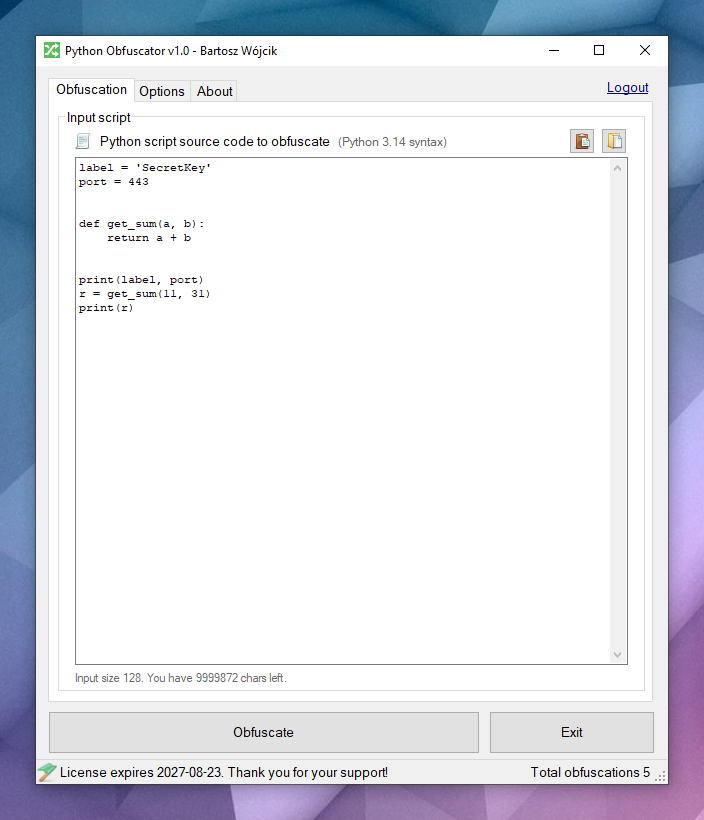
That’s the Windows GUI. Same engine as the online tool, the CLI, the SDKs, and the VS Code extension.
Why bother?
If you ship a .py file, the customer already has:
every string (URLs, license messages, the “secret” in
SecretKey)every function name
the control flow, in order
anything you thought was “hidden” in a helper module
Obfuscation is not encryption of the universe. It will not stop a funded lab with six months and a debugger. It will stop the cheap reverse: grep, decompile, rename a few symbols, steal the license check, ship it as theirs.
That’s the job. Raise the cost above the value of the script.
What it actually does
You pick the passes. I did not glue this into one “make it messy” button and call it a day — though Check All exists when you mean it.
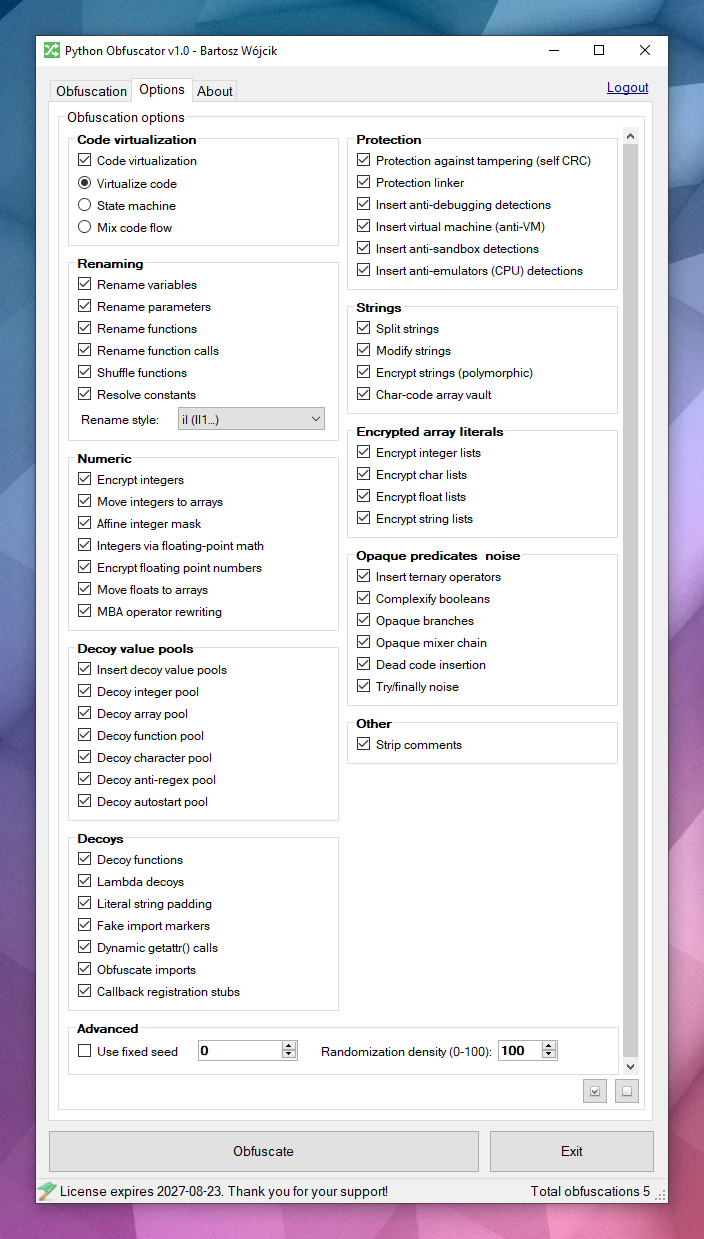
Code virtualization — one mode at a time:
VM — selected statements go into a generated micro-VM with shuffled dispatch. You reverse the interpreter first.
FSA — linear blocks become a dual-state automaton. Numeric states instead of top-to-bottom reading.
Flat — classic control-flow flattening, lighter than the VM.
Strings — split, mutate, stash fragments in a char-code vault, encrypt with a new polymorphic decryptor every run. Not XOR-with-a-constant. The shape of the loop changes, which is annoying for both grep and the LLM paste workflow.
Numbers — encrypt integers and floats, lift them into arrays, affine masks, mixed boolean-arithmetic (MBA) for operators.
Renaming — variables, parameters, functions, call sites, plus shuffle and constant folding. Styles include il, o0, confusable, hex, homoglyph, mangled.
Noise — dead code, opaque predicates, try/finally junk, decoy functions, fake imports, dynamic getattr calls, random value buckets.
Protection (off unless you turn it on — including --all):
Self-defending — a probe fingerprints the module
CodeTypetree. Patch the file and decryptors start returning garbage.Protection linker — decoy functions and fake calls so a copied fragment still looks like a program. Traps fire if someone edits it or runs a piece alone.
Anti-debug / anti-VM / anti-sandbox / anti-emulator — optional, silent exit. They also fire on some developer machines. Leave them off unless you mean it.
The pipeline in one picture:
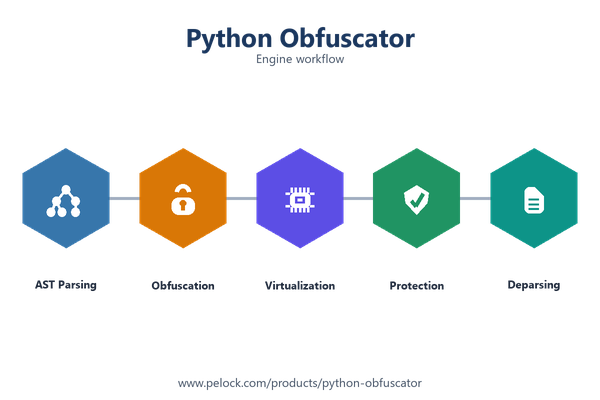
AST in. Transforms. Python out. Always run the result on the interpreter you ship with. Python has corners. I hit them too.
Same script, worse file
This is the kind of thing I throw at it:
label = 'SecretKey'
port = 443

def get_sum(a, b):
    return a + b

print(label, port)
r = get_sum(11, 31)
print(r)
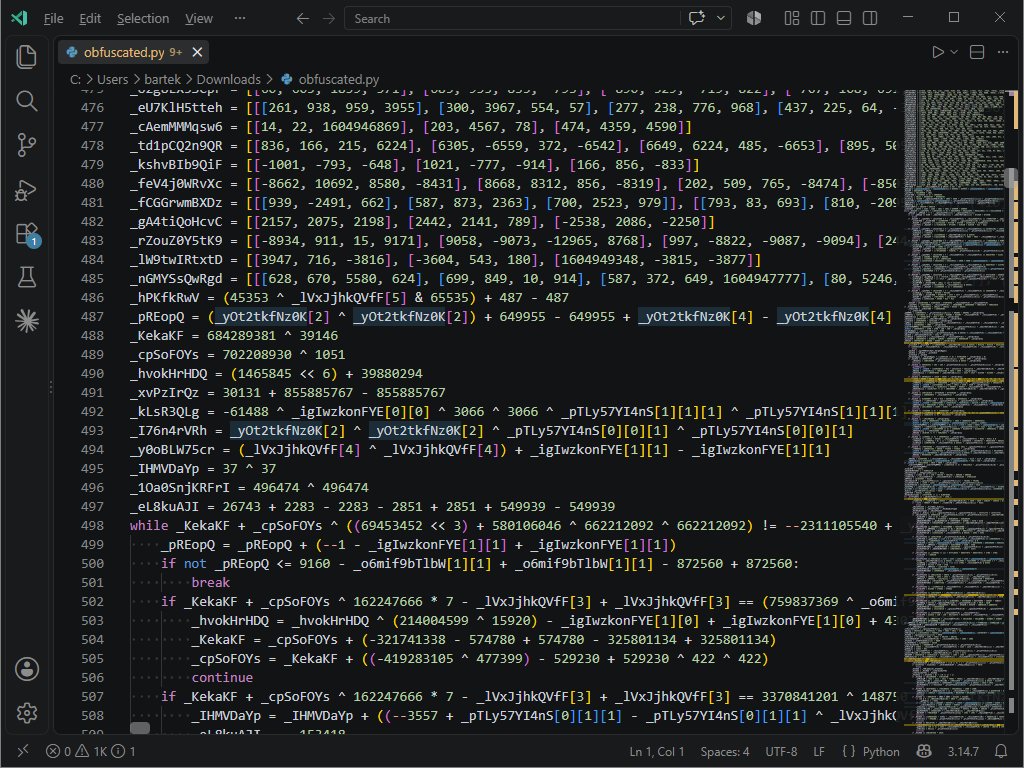
It still prints SecretKey 443 and 42. The file you get back does not look like that.
More shots of the UI and CLI: screenshots.
Where people actually use this
Commercial scripts and tools. You sell a .py (or a small package) to customers who are not going to run a private build farm. Obfuscate the release artifact. Keep your working tree clean.
License / activation helpers. The check that talks to your server, the string that is the product name, the expiry message. Encrypt those. Skip the public API you promised not to rename (see the decorator below).
Internal automation that still leaks. A one-off agent on a vendor laptop is still source. If you would be embarrassed to see it on a paste site, run it through the obfuscator.
CI / release jobs. Windows GUI is for poking at options. Linux CLI (and the Web API) is for the Makefile. Obfuscate as a build step, then test the output, then ship.
Trying a setting without installing anything. Paste a snippet into the online tool. Demo mode is enough to see integers-to-arrays, MBA, and string encryption on a short file (1000 characters). Plug in a key and the rest of the pipeline unlocks.
Editing in VS Code / Cursor all day. Right-click, obfuscate, new tab. That is the extension.
Download it
Demo package, Windows installer or zip. CLI works on Windows and Linux (Mono on Linux for the C# command-line client). Internet is required — the heavy lifting is the hosted engine.
Installer: python-obfuscator.exe (v1.0)
Needs .NET 2.0/3.5 on Windows, a few MB of disk, 512 MB RAM. Nothing exotic.
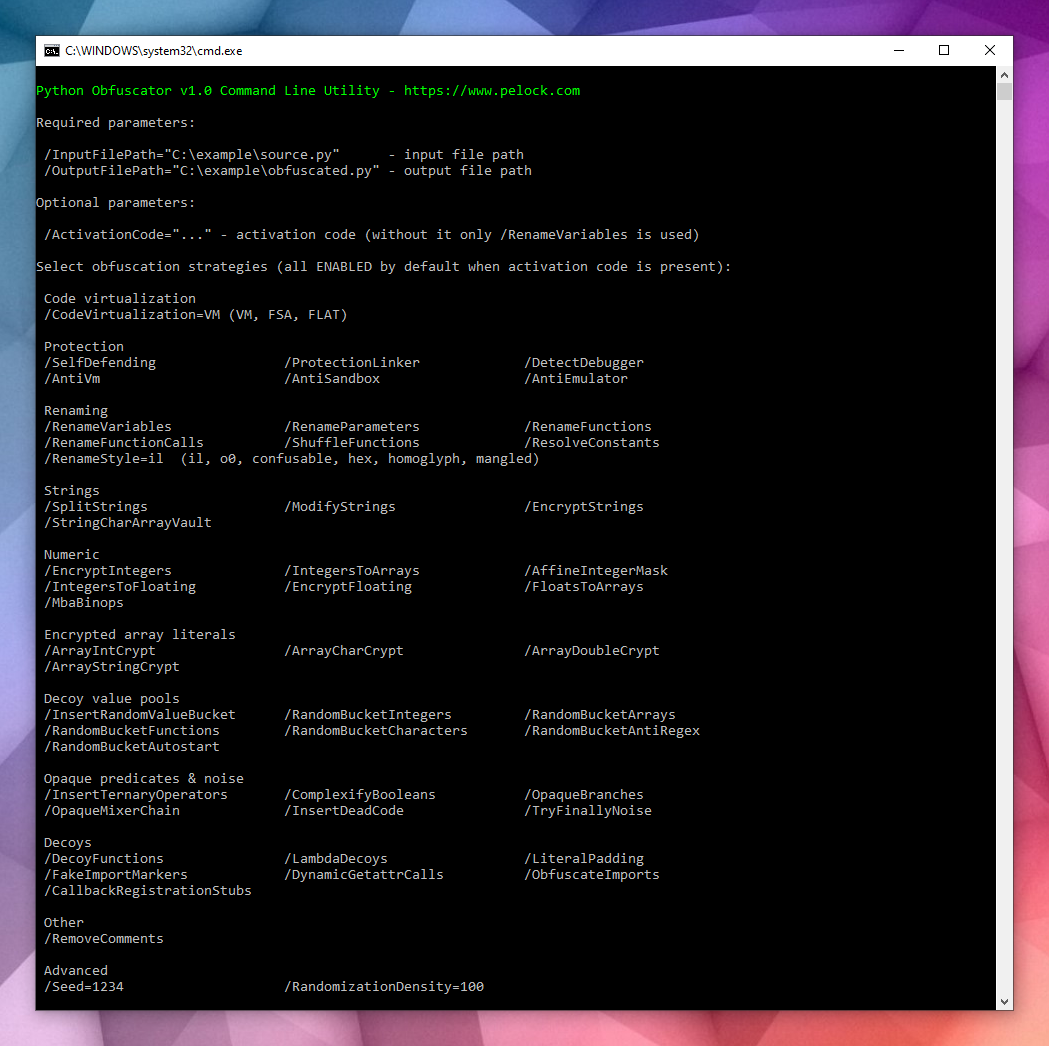
Licenses: Personal $149 · Company $499. Empty key = demo.
VS Code (and Cursor)
I live in the editor. So the obfuscator does too.
Right-click a .py → obfuscate. Shortcut is Ctrl+Alt+O (Cmd+Alt+O on a Mac). You get obfuscated.py in a new tab. Settings are the same switches as the website — virtualization mode, renaming style, strings, numbers, protection.
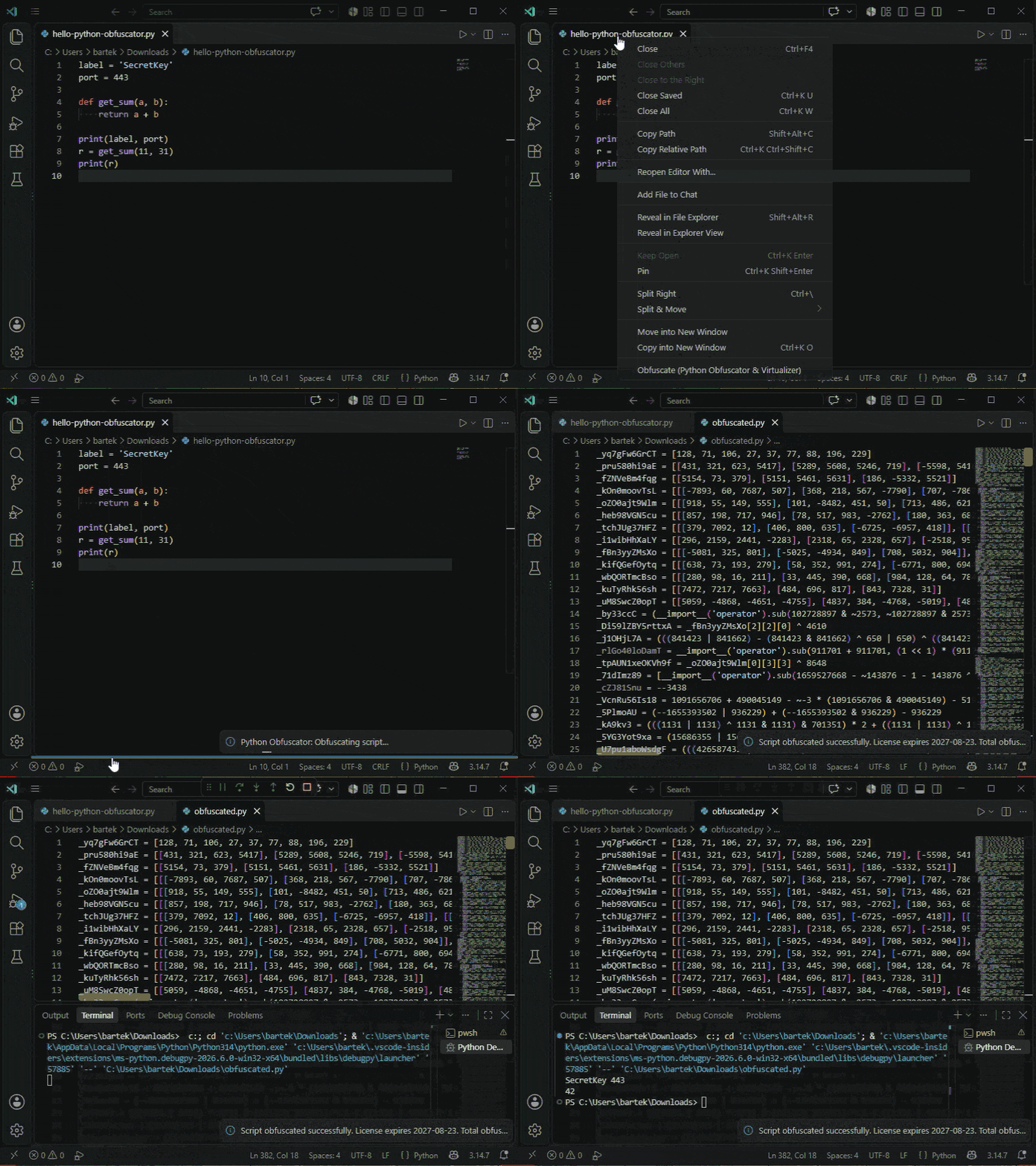
VS Code Marketplace: PELock.python-obfuscator-virtualizer
Open VSX (Cursor and other VS Code forks): PELock/python-obfuscator-virtualizer
No key = demo, 1000-character cap. Paste an activation code in Settings (pythonObfuscator) and you get the VM, FSA, flattening, renaming, integrity, the lot.
Web API — put it in a build
Everything the GUI can do is a POST that returns JSON. Docs: pelock.com/products/python-obfuscator/api.
I wrapped it for the languages people actually ask for:
Language | Install | Package | Source |
|---|---|---|---|
Python |
| ||
PHP |
| ||
JavaScript |
| ||
C# / .NET |
| ||
Rust |
|
Import for the Python SDK is pythonobfuscator. Minimal call:
from pythonobfuscator import PythonObfuscator

client = PythonObfuscator("YOUR-ACTIVATION-CODE")

source = """label = 'SecretKey'
port = 443

def get_sum(a, b):
    return a + b

print(label, port)
r = get_sum(11, 31)
print(r)
"""

result = client.obfuscate_script_source(source)
if result and result["error"] == PythonObfuscator.ERROR_SUCCESS:
    print(result["output"])
You can also pass a file path (obfuscate_script_file(...)). Defaults turn the public strategies on; set booleans yourself if you want a thin pass. code_virtualization is vm, fsa, or flat. Protection flags stay off unless you set them.
Each GitHub repo has a full example with every public flag. I got tired of “which boolean does what.”
login() is there if you only want to check demo / expiry / usages_total / string_limit without obfuscating.
Leave some functions alone: the decorator
You cannot virtualize everything. A handshake string that a test asserts on. A public class name you promised. A function someone monkeypatches.
Python already has a way to mark that. I shipped a tiny package so you can write it in source.
pip install python-obfuscator-decoratorImport name is obfuscator. You only need the package to run the original file. The obfuscator reads @obfuscator.skip off the AST, applies the skip, then strips the decorator and any leftover import obfuscator. The file you ship does not depend on this package.
import obfuscator


@obfuscator.skip(obfuscator.ENCRYPT_STRINGS, obfuscator.CODE_VIRTUALIZATION)
def handshake(secret: str) -> str:
    return secret


@obfuscator.skip()
class LicenseCheck:
    def verify(self) -> bool:
        return True
What the arguments mean:
ENCRYPT_STRINGS— keep that literal readable (no string encryption on that construct).CODE_VIRTUALIZATION— skip VM, FSA, and flatten on that function or class.Bare
@obfuscator.skip()or@obfuscator.skip— don’t touch this construct at all.String keys work:
@obfuscator.skip("encrypt_strings").A skip on a class covers nested methods.
What it will not do: module-level statements have no decorator. Lambdas neither. Don’t skip rename on a function and then expect callers to keep the old name after you renamed everything else.
If you write about it, I’ll send you a key
I do this for my other tools. Write a post, tweet it with #python #obfuscator #obfuscation, send a real bug, or a skip/obfuscation idea with a snippet attached. Email me. If it’s not spam, you get a code.
Try it:
Test the output. Then ship.
Bartosz Wójcik


